Showing posts with label Firefox. Show all posts

Tuesday, January 19, 2010

Make Your Firefox Fast


This tricks will improve the speed & load time of firefox. And you will be able to surf faster.


Type about:config in the address bar, Then look for the following entries, and make the corresponding changes. 

Changing the Homepage of Firefox

The webpage that Firefox loads when first opened is referred to as the homepage. A lot of people set their homepage to their email page, a news webpage, or some other page they use on a regular basis.

This page will guide you through changing your Firefox Homepage.

Open up Mozilla Firefox if you haven't already.

Get traffic to your website or blog using Firefox tricks and tools

There are several methods to bring traffic to your website. Mostly spoken one is advertising your website. But rather than advertising creating back links to your blog is the key to get traffic to your website. Let me share you some tips to get traffic to your website using FireFox. The most commonly used Firefox plug-ins/add ons that increase your efficiency.

Monday, January 18, 2010

Its a little bit risky to store password using firefox

Often when we enter our User Id and password detail to the website of our choice while browsing using Firefox, a modal dialog pops up asking us whether we would like Firefox to remember the username/password for that site.


Often, many people i know use this feature of Firefox without understanding the pain points associated with it. Let me show you how easy it is for anyone accessing your firefox to actually gain access to your Username and Password combinations.

copy firefox password file

[How To]Copy Firefox passwords to new os|Backup firefox password fileAll firefox passwords are stored in three files
signons.txt, signons2.txt, key3.db
These files are stored in your firefox profile folder.
In Windows XP firefox profile is at:
c:\Documents and Settings\WindowsUsername\Application Data\Mozilla\Firefox\Profiles\profilename
Copy these three files and save them where ever you want and if you want these passwords in your other [...]

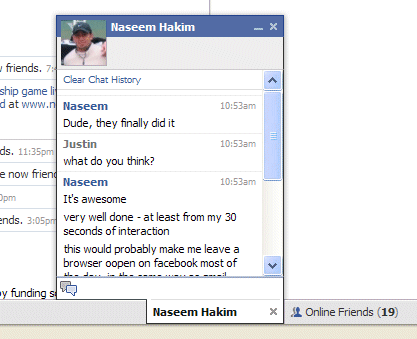
Adding Facebook Chat in Firefox Sidebar


This is a all new trick and a latest update from facebook one of the best networking site. Using this trick you can run the face book chat application from firefox sidebar.
This basically have two advantages:-
1. You need not to open the facebook homepage again and again to see a list of friends that are online.
2. You can chat to your friends even while surfing and opening web pages.

Easily Stop Firefox from Consuming Your Cpu Cycles


You may be thinking that you have done all the things to stop this nasty habit of Firefox. But have you tried this? I’ve done this is Firefox 2.0.0.3 but this will work with all the other versions of Firefox. Ok! here’s the trick.

1. Type about:config in the address bar and press Enter to get the Firefox expert configuration page.
2. Type browser.cache.disk.capacity in the Filter text box.
3. Modify the value to 16384
4. Restart Firefox and there you go!
After doing this, CPU usage for Firefox should stay under 10%

Firefox Hacks And Tweaks

Accessing your about:config page
In your Firefox, type about:config in the address bar
You will be shown a warning page. Click the “I’ll be careful, I promise!” button to proceed.


On the main page, you will see a long list of configuration entries. Enter the name of the key you want to update in the “Filter” field. The list will narrow to only the entries that match your keyword
as you type.

Firefox Shortcuts


1)      Keyboard shortcuts. This is where you become a real Jedi. It just takes a little while to learn these, but once you do, your browsing will be super fast. Here are some of the most common (and my personal favs):
  • Spacebar (page down)
  • Shift-Spacebar (page up)
  • Ctrl+F (find)
  • Alt-N (find next)
  • Ctrl+D (bookmark page)
  • Ctrl+T (new tab)
  • Ctrl+K (go to search box)
  • Ctrl+L (go to address bar)
  • Ctrl+= (increase text size)
  • Ctrl+- (decrease text size)
  • Ctrl-W (close tab)
  • F5 (reload)
  • Alt-Home (go to home page)

Friday, November 6, 2009

Drag & Drop in Firefox

There are many things that you can drag and drop in Firefox.

* Drag the favicon of any site to your home icon to set it as the home page.
* Drag a hyperlink (or image) to the new tab icon to open the link in a new tab.
* Drag a download link (or image file) to the download icon to instantly download the file.

LinkWithin

Related Posts with Thumbnails