Monday, September 26, 2011

Don't know How to use torrents? OR download from torrents.


First of all u have to download a torrent application such as bit torrent, utorrent
then go to download the .torrent file by clicking " Download Torrent" and save it in your computer > open the folder where you have stored it. You will see a icon with torrent symbol, double click it your download will automatically start. Have fun!!

Thursday, May 26, 2011

Which Wi-Fi Router Should I Buy?

The Basics: Things Your Router Should Have


You'll definitely want to make sure the router supports the latest WPA2 security rather than just WPA or, even worse, WEP. Most current routers support WPA2, but free routers from an ISP can sometimes be really outdated.


If you're building a wired network with clients that have gigabit ethernet adapters, also look for a router that supports that fast gigabit transfer speed.

 
Also make sure the router supports Wireless-N (802.11n) for fastest transfer speeds; Wireless-N is backwards compatible with Wireless-G (802.11g) and Wireless-B (802.11b) devices, so your older computers and gadgets will still be able to connect to it.

 
Do You Like to Tinker? Consider Custom Router Firmware

  
If you'd like to hack your router for more features and customization with free, open-source firmware like Tomato or DD-WRT (both can help you turn a $60 router it into a $600 router), be sure to check those site's supported routers before going shopping. Some routers—like Buffalo's Nfiniti G300NH—actually ship with DD-WRT pre-installed. (Ed. note: This is the router I use.)

 
Dual Band or Not?

 A dual band router can broadcast wireless signals on the popular 2.4GHz band or the 5GHz one (or both at the same time). This allows for greater compatibility with more wireless devices, and this increased versatility may be worth the slight increase in cost. With a dual band router, you can separate the 5GHz traffic from the more crowded 2.4GHz traffic—so your older Wireless-G devices don't drag down the rest of the network.

  
You can get a really cheap (under $40) dual-band router, but, as of this writing, the most highly-rated ones tend to hover around the $100 mark and can sometimes cost almost double their single-band counterparts. The dual band Netgear N600 (WNDR3700) retails for $159.99, while the Netgear N300 (WNR3500L) is $99.99.

In the end, whether or not the extra cost for a dual band router is worth it depends on your network needs. If you want to run your home network like a coffee shop for easier guest access, a dual-band router is key. Look for a router that specifically says it allows guest access—which separates the public Wi-Fi from your private Wi-Fi network.

Also, keep in mind that some routers may be dual band but not support simultaneous operation on both the 2.4GHz and 5GHz bands (i.e., dual-radio broadcasting). If you have a mixed network—some older Wireless-G clients that can't or won't be upgraded to Wireless-N (e.g., the Nintendo Wii) and also Wireless-N devices—make sure the router supports simultaneous dual-band.

 
Other Features to Consider

 
Routers are offering a lot of added networking features these days. Here are a few that might interest you:

 
Wi-Fi Protected Setup (WPS) - This reduces the number of steps you might have to take to connect your wireless devices to your router. Push a button on the router or enter a PIN number to network the devices, and the WPA2 security will be set up for you. If you want the most streamlined setup possible, WPS is great, but it can make manual connections harder.

 
USB Ports - If you'd like to create a shared network drive, some routers enable you to plug in a USB hard drive to the router and share that drive. It's a useful feature, but can be very slow and/or inconvenient (forcing you to use a FTP or HTTP server to access the drive, for example). If you don't have a network attached storage (NAS) device, however, and don't mind the performance compromise, look for this feature in your next router.

 
Printer Sharing - Some routers also let you plug in a printer to the USB port for network printing. You might need to install printer drivers on all the PCs to use this, but if you don't have an easily network-able printer you can use your router as a print server (keeping in mind this may also slow the router down).

  
Firewall and VPN Support - Most routers today say they have the best intrusion detection, firewall, and VPN support. If you need to access a company network over VPN, however, make sure you talk to your company's IT department before buying the home router. As a former IT admin, I saw some users' routers just wouldn't work with our VPN implementation, making it a problem for everyone all around. At the very least, your router should support VPN passthrough (IPSec, PPTP and L2TP) for typical VPN traffic.

  
Remote Access, 3G/4G and more - The latest routers are adding even more functionality, like being able to remotely access computers on your network through the router or sharing 3G/4G broadband connections. Some are being designed to more easily connect to your TV or media center. There aren't that many routers that support these newer features, so you'll have to decide how important this is for your usage scenario.

 
Which Router to Buy

  
As for which particular router you should buy, that depends on your budget and needs (above). You might find best performance/compatibility using the same brand for both your router and network cards. Or if you're used to using Linksys products, upgrading to a newer Linksys model might make sense for you.

  
SmallNetBuilder is a great source for finding router reviews and recommendations. Here are a couple of options to get you started, though:

 
Buffalo Technology Nfiniti Wireless-N High Power Router & Access Point (WZR-HP-G300NH) - currently $65 on Amazon, supports WPA2 and 1GB ethernet, plus 2-year warranty
  • Linksys E4200 - a simultaneous dual-band N router that also looks pretty sleek ($179.99 direct on Cisco) 
  • Netgear N600 Wireless Dual Band Gigabit Router - has USB storage option and guest network access (retailing for $159.99 from Netgear)
 

How to Sync Your Desktop Email Client (Outlook or Thunderbird) Across Multiple Computers

If you use webmail like Gmail or Hotmail, there's really no syncing needed to keep your email coordinated across multiple computers—open up your web browser on any computer and everything is just as you left it. Those of us who prefer—or are required to use—a desktop program like Microsoft Outlook or Thunderbird, however, have to work a little harder to get our emails, contacts, calendar events, and tasks synchronized across multiple devices. Here's how to set it up.

You've got several ways you could go about syncing your desktop email client between computers, but the best, most complete method involves storing your application profile in a file-syncing tool like Dropbox so that all of your settings are automatically synced between your computers. Here's how to move your Microsoft Outlook PST file or the profile for cross-platform Thunderbird to accomplish that goal.

Why not just use IMAP?

If your email account can use the IMAP protocol, this is the easiest way to have your email synced; IMAP syncs even your sent email with the email server. However, some companies or service providers require you to use POP3; with POP3 you can change a setting to save emails on the server, but your sent emails aren't synced.

Another reason to go the Dropbox route is to sync your settings and other items, such as tasks, in your Outlook or Thunderbird program across all your computers.

How to Move Your Outlook PST Files to Dropbox

Dropbox works great as a syncing solution for Outlook especially, since the PST file is stored and accessed on your local drive; storing the PST file on a network share, by contrast, can result in really bad performance problems or corruption of the file. Dropbox is also one of the few programs that can accomplish this syncing without a lot of hassle.

>>The instructions below are using Outlook 2010 on Windows 7. The exact menus may not be the same in older versions, but you should be able to find similar commands. 
  1. To move your Outlook PST file, first you'll need to find it. In Outlook 2010, you can right-click on Personal Folders and choose "Open File Location" to see the file in Windows Explorer.
Alternately, you can go to your Control Panel > Mail settings (if you have trouble finding it, look under User Accounts or simply search for "Mail" within the Control Panel). Click on the "Data Files... button" and in the new window, you'll be shown the location of the PST file. (Usually it's under C:\Documents and Setttings\\Local Settings\Application Data\Microsoft\Outlook.)

2. Close Outlook, then go to Windows Explorer and cut and paste the file to your Dropbox folder.


When you next open up Outlook, you may be warned that the PST file can't be found. Click OK, then browse to your Dropbox folder to find the new location.
 
 You may also have to change where the emails get stored:

  1. Click on the File tab, then Info.
  2. Under Account Settings, click Account Settings.
  3. On the E-mail tab, select the account and click Change Folder. 
  4. Select the Inbox to change the email delivery location.
From your other computer(s), point Outlook to the Dropbox data file by going again to the File tab in Outlook > Account Settings. In the Data Files tab, add the moved PST file, set it as the default, and remove the old location.

There are a few caveats to this approach:


  • You'll need to close out of the Outlook program on the first computer before opening the PST file on the second one. This is very important! Dropbox is pretty good at creating duplicate, "conflicted" copies of the PST files if necessary, but constant syncing attempts of an open PST file can lead to corruption. So close out of Outlook and let Dropbox do its syncing before you open Outlook on the next computer.
  • If your Outlook file is very big, you could run out of space in your Dropbox account. Keep this in mind, and you may either want to upgrade your account or follow our cheapskate's guide to getting more free space on Dropbox.
Move Your Thunderbird Profile to Dropbox or a Shared Network Folder

If you're using the cross-platform Thunderbird email client, you could move your profile to an external drive (like a USB thumbdrive), but that requires carrying around that USB stick and bringing it to each computer you need to access.

The better option is to move your profile to a new shared location—either a shared network folder or your Dropbox folder. Here are the instructions for moving the profile.

1. First make sure Thunderbird isn't running.
2. Next, find the profile folder. On Windows, the default location is in C:\Users\\AppData\Roaming\Thunderbird\Profiles\ or C:\Documents and Settungs\\Application Data\Thunderbird\Profiles.

On Mac, the location is ~/Library/Thunderbird


On Linux, the path is ~/.thunderbird/

3 Cut and paste the xxxxxxxx.default folder to your new location (e.g., Dropbox folder)

4. Next, edit the profiles.ini file in a text editor. You'll find the file in the same location as the profiles folder above.
5. Edit the "Path=" line to the new location, e.g., C:\Users\\Documents\Dropbox\xxxxxxxx.default

When entering a non-relative path in Windows, use backslashes (relative paths get forward slashes), and change IsRelative=1 to IsRelative=0.

6.Save the profiles.ini file and restart Thunderbird.

On your other computers, you can copy over the profiles.ini file so they also point to the new location of your Thunderbird profiles folder. That should be it.

(For more information on moving your profile, see Mozilla's Moving your profile folder instructions.)

Note: You could also move the portable version of Thunderbird into your Dropbox folder for speedier access.

There are lots of reasons to use a desktop email program (better offline capabilities, email sorting, and collaboration features depending on your office needs). Lack of support for syncing across multiple computers shouldn't stop you from using Outlook or Thunderbird. Syncing your profile with Dropbox, you can take your desktop email experience with you on all your computers.

Do you have a different email syncing solution or desktop email tip? Let us know in the comments.

You can contact or follow Melanie Pinola, the author of this post, on Twitter.

Contact information for this author is not available.

Tuesday, August 31, 2010

Choose or Click Your interest Below

All Antivirus

Facebook Symbols And Emoticons

N360_2010_4.0_Build_127 --- 90 days trail---


products ever since I started using Norton Internet Security  about 6 months back. The new Norton products and solutions have had a radical shift in terms of performance (which I deem very important), features and even the UI. This time round I got hold of a copy of Norton 360 Version 4

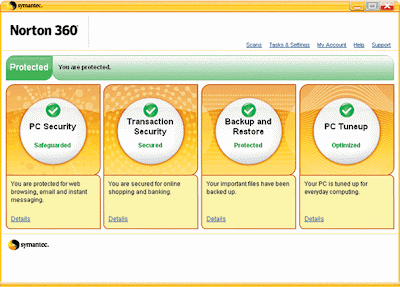
First things first – Norton 360, as the name truly suggests is a complete 360⁰ solutions that truly runs out of the box from the time you say go (err… install). Norton 360 takes care of all things related to security for your PC / Laptop / Netbook and also takes care of a few more mundane tasks. It is packed with a powerful Anti-Virus, a super smart Fire-Wall, a password safe storage solution and also a auto-backup feature.


Lets deep dive into each of these features separately and the significant improvements that you get with the new Version 4.

Norton 360’s Anti-Virus Solution:
One of the most powerful and yet light weight anti-virus solution that I have seen for quite sometime now and it’s getting better. The most useful and exciting feature that I find is called “Live Scan” – this is switched ON by default and runs whenever it finds the computer usage to be idle or low. “Live Scan” automatically determines whether to run a ‘Quick Scan’ or a ‘Full System Scan’. The advantage that I get with this cool new feature is that it runs usually when I’ve left my comp and gone to grab a cup of coffee or catch up on dinner – so no more hassles of setting up a schedule and making sure your comp is up and running for the scheduled scan to run.
 I for once have had issues running scheduled scans – missing most of the schedules all the time, setting up a schedule over the weekend or late times of the day means that your machine needs to run over that time to hit the schedule. Now all that looks passé with this very cool and intuitive option. The best part of all this is that the scan magically ends as soon as you once again start using your computer – so you never feel that any of the computer resources have been sacrificed for the scan.


Norton 360’s File Insight Feature: How often do we download .exe’s / setups and what not off the internet – but how do we know that whatever you’ve downloaded is really legitimate and free of any virus, Trojan or root-kit. The later part is taken care by the anti-virus solution but never the legitimacy of the file.


You are always left to make the decision yourselves based on the site from which you have downloaded, the person/forum that recommended it, etc – but even for a seasoned internet person like me, it’s quite a daunting task to decide. That’s when you’ve got help in the form of ‘File Insight’ which checks the file against an online database and reveals some interesting facts, let alone whether the file is safe to use/install. It churns out some cool facts such as the number of users who have downloaded/installed the file, safety level of the file and from where you got it to the physical location on your hard-disk that the file resides on. That’s a lot of cool and interesting facts to consider before you make a choice.

Norton 360’s Firewall : This is a very simple and lucid fire-wall solution, nothing much to worry on and it’s so very simple that if you can use your computer for browsing you can configure the firewall too easily. But I guess the default setting that Norton 360 ships out with is more than enough and you don’t really need to tweak any of the configurations frankly speaking. Also Norton's new SONAR (Symantec Online Network for Advance Response) behavioral monitoring system does a good task in combating phishing attacks and real time surveillance of your PC from attacks of the outside work over the network.

Norton 360’s Identity Safe Storage: Quite a cool option to store your usernames and passwords for the sites that you often visit. All the information is safely encrypted and stored. You now need to only remember one master password to access the safe storage.

But, I am really not a very big fan of this solution since it’s not portable really. In the sense, if I happen to use a public computer at a kiosk or over at a friend’s place – I really can’t harness this solution easily. Also, since I’ve become lazy in not typing the password’s each time to login – over a period of time one tends to forget the actual credentials. There must be a better solution for this problem but I can’t think of one that would be truly safe in all scenarios for now.

Norton 360’s BackUp feature: Looks like Norton is slowly consolidating it’s portfolio and that’s really a boon for users like me and you. The backup feature is pretty tidy and easy to setup and use. A few clicks on configuring your backup drive/media and the locations to backup – you should be ready to go. Believe me it’s a very simple process and best of all it’s right out of the box for all practical purposes.

Norton 360’s backup and recovery tool also provides you a free 2GB of online storage space that you can easily backup your important documents and photos. This free Online Backup is simply too cool if you’re out of home/office on a remote country with only a PC connected to the internet (read an airport) - viola you get access to all your backup files right there online.

Also for an extra charge you can easily increase your online backup storage up to 25GB at $69.99 per year. This is a very cool feature that the other backup / anti-virus products like McAfee currently donot do not offer today.

Performance has really been a deciding feature for me to switch over to Norton (this statement looked very very unlikely about 10 months back – if you were to ask me). There is absolutely no reason why you shouldn’t choose Norton 360 over the ample number of products that are out there in the market.
Norton 360 1 PC license costs INR 1795 - but the deal is with the 3 PC license at INR 3200, nowadays most of us have a desktop, laptop and netbook - so it does make sense to have a three license one - these also come with 2GB of online storage space. The premium edition includes 25GB of online storage space and a three PC license, the suggested retail price is INR 4025. Both - standard and premium editions of Norton 360 includes a one-year service subscription to use the product and receive Symantec’s protection updates. All Norton 360 users with a valid product subscription are eligible to receive the latest product updates via the subscription service model.

Norton 360 not only protects your computer but also tunes up your system for the best performance like doing a disk defragmentation or fixing driver issues and also backs up essential files – all in the background (now that’s the icing on the cake). The list of features and the great value for money that it provides is simply endless – as I started off this review, it’s truly an out-of-the-box solution where you deploy and completely let it take care of everything – all in the background.

Key Technologies
  • Anti virus
  • Anti spyware
  • Antispam and Parental Controls
  • Email scanning
  • Antiphishing
  • Online identity protection
  • Web site authentication
  • Firewall protection
  • Automatic backup and restore
  • Automatic updates
  • PC performance tuneups
  • Embedded support
  • Rootkit detection
Important Features

  • PC security that defends you against a broad range of threats.
  • An excellent firewall that lets you control access in and out of your computer.
  • Transaction security that safeguards you against online identity theft.
  • Automatic backup and restore to protect your important files from loss.
  • PC tuneup to keep your PC running at peak performance.  
  • Live Update.
  • Ongoing Protection that keeps your computer safe from the latest Internet risks.
  • Windows Vista and Windows XP support.

Download FREE 90-day Trial of Norton 360

Download Link -

http://uploading.com/files/5a2a69ab/Norton360.rar/

Note - Leave the comments if the links are broken or downloads aren't working for you.
         -Copy and paste the above url into the new tab or in new browser to download the file.


Monday, August 30, 2010

Choose or Click Your interest Below

All Antivirus

Facebook Symbols And Emoticons

Youtube Downloader - Download and convert videos instantly from any video hosting website!!

What is YouTube Downloader?

YouTube Downloader is software that allows you to download videos from YouTube, Facebook, Google Video, Yahoo Video, and many others - whole list is given below and convert them to other video formats like ipod, iphone, mp4, 3gp, mp3, avi, wmv etc.

The program is easy to use, just specify the URL for the video you want to download and click the Ok button!

It also allows you to convert downloaded videos for Ipod, Iphone, PSP, Cell Phone, Windows Media, XVid and MP3.

You can use YouTube Downloader to download the videos of your choice from home, at the office or in school.

Download YouTube Downloader now and get started downloading your favorite videos from YouTube.

Enjoy!


YouTube Downloader can download videos from these sites:
YouTube
Bing Video
Blip.tv
Bofunk
Break
CollegeHumor
Crackle
DailyHaHa
DailyMotion
EbaumsWorld
ESPN Videos
FaceBook
Filecabi.net
FunnyOrDie
Google Video
Guba
keezmovies
LiveLeak
MeFeedia
MegaPorn
MegaVideo
Pornhost
Pornhub
PornoTube
Raajje.tv
RedTube
Revver
Shufuni
Slutload
Spankwire
Spike TV
Stickam
Streetfire.net
Tangle
Tontuyau
TNAflix
Tube8
Ustream.tv
Veoh
Vevo
VideoClipsDump
VideoJug
Videu.de
Vimeo
VodPod
Xhamster
XNXX
Xtube
XVideoHost
XVideos
Yahoo Video
YouJizz
YouPorn
Yuvutu

italics indicates partial support for that site due to mixed content on the site or other irregularities.
bold indicates support fixed / added in the latest version.

Download YouTube Downloader now


Monday, August 23, 2010

Choose any Mobile S60 Application To download

Paint Pad
Marble Maze Game
Bright Flash Light
Mobile as wi-fi Router
Hack Mobile with Bluetooth
Find Your Lost Mobile
Google Map S60
Create Mobile Theme
Nokia Step Counter
Pdf Reader
Trace Any Phone Number
Capture Your Mobile Screen
(i.e. Small summary with Main Topic)


Screen Snaps 60v5


A Screen shot taker for an S60v5 device is finally released. It’s taking the screenshot by pressing camera button. There are plenty of applications for taking screen captures on your PC, but what happens if you want to grab an image of your phone’s display in order to highlight something to your friends, or report a technical problem, for instance? Well, grab a copy Best Screen Snap and your problems will be solved. This software is specifically designed to take screenshots of applications installed on your workstation.

Bright Light Touch 1.0 s60v5

Similar to the flashlight but more easy to use.

Light up your device, you can use it as a torch! Turn on the camera flash by sliding the on-screen switch.

Joikusoft JoikuSpot Premium v2.50 812 S60v5 SymbianOS9.4 Signed

JoikuSpot software turns your mobile phone instantly to a personal and secure WLAN (Wi-Fi) HotSpot.


JoikuSpot, developed by Joikusoft, is a secure and award winning mobile software solution that turns mobile phones instantly to WLAN (Wi-Fi) HotSpots.

With JoikuSpot, connect your laptops, iPods, EeePCs and internet tablets to internet easily and securely using your mobile phone's 3G internet connection. You will carry internet in your pocket, and will always have a secured personal WLAN (Wi-Fi) HotSpot on-the-go! Multiple devices can connect in parallel and seamlessly share the same 3G internet connection.


JoikuSpot Light Features

- HTTP(S) protocol support
- WLAN access to internet with laptops, iPods and internet tablets
- Secured access and user control
- Multiple parallel connections
- User definable access point and settings
- GPS location mapping Supports S60 3rd Ed mobile phones

JoikuSpot Premium Features

- All the JoikuSpot Light functionality +
- Secured access to corporate intrawebs (VPN)
- Email support
- Full support for all network access protocols such as Outlook, Skype, Gmail, YouTube, Messengers...
- No forced default landing page
- 100% customizable for operator and corporate whitelabeling and licencing.


This includes :- Bright Light Touch + Screen Snaps + Joikusoft JoikuSpot Premium + Paint Pad + Wallpapers. To See the details of these Application Check their Links.

Paint Pad v1.0.0 S60v5 N5800xm and N97

Paint Pad v1.0.0
Draw on blank background (just choose color), or load background from file or just take photo and then load picture and express your mind!

Saturday, August 21, 2010

Rotary Dialer for Nokia 5800 XpressMusic

Rotary Dialer emulate an old fashioned rotary dialer for Nokia 5800 XpressMusic. Its fully functional and uses the vibrate of the phone to great effect. Once you’ve entered your number you can hit the “Call” button to place a call.

Nokia Step Counter v0.21 S60v5 ---Accelerometer Application

Ever wanted to how much you walk or run as you go about your daily life?
The Nokia Step Counter not only counts your steps, it also determines the distance you have covered and your energy expenditure.You can even compare your activity levels on different days by looking up the summaries stored in a handy diary.

Want to know how it all works? Your steps are measured by analyzing the output from an accelerometer in your S60 mobile device. All you have to do is carry your phone around with you whenever you move, for example in a pocket of your clothing, attached to a belt or your upper arm, or in a handbag worn over your shoulder.

Wavesecure 3-2.2.632 - Secure Your Mobile

The ultimate security application for your phone. It not only helps you track the lost phone but also ensures full security of the data on the device.

Marble Maze for Nokia 5800 XM

Marble Maze is one of my favorite accelerometer based games and I can’t tell you how happy I am to see that game is now optimized to utilizes the orientation sensor built inside the Nokia 5800 and now supports the new, 5th edition sensor framework.

Even better, thanks to Nokia India, the game is free for the 5th edition users, while the 3rd ed version is available as trial only! The only problem is that game only works with Indian product codes it seems but to be honest I'm not sure either, will try to find something more about and keep you informed of course!

Marble Maze is a game in which you need to control a ball in a labyrinth by tilting the device in your hands and lead the ball into a goal.

Game is actually based on the classic game that many of us have played when we were little children where tiny ball have to make its way around the obstacles, through the wooden maze, without losing it down a hole.

The point of the game is to navigate your ball through various obstacles and reaching the goal. What separates this game from similar puzzle/maze games is that instead of controlling the marble by the keys you have to tilt your phone to move around and reach the destination.

Currently there are 40 different labyrinths to solve, and 3 different types of balls viz. a metal ball, a rubber ball, and a super pingpong ball. In this super addictive game you can advance from simple to the more difficult levels requiring skill, accuracy, and determination to hit the high scores. Of course each ball has different physical characteristic, different weight and difficult.

Friday, August 20, 2010

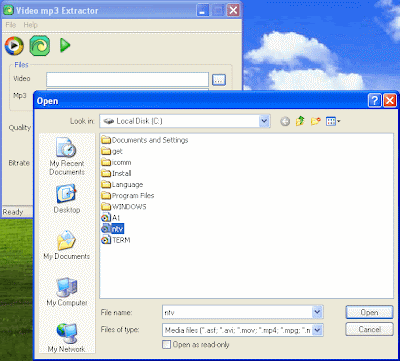
Extract MP3 from Video for Free - Video MP3 Extractor 1.8

Video mp3 Extractor is easy to use tool to extract audio from Video AVI, ASF, WMV files. Output audio file is mp3, and you can listen extracted audio with your mp3 player without any additional conversion or modification. Video mp3 Extractor provides simple and fast method to rip audio from video and save as MP3.

Quick and Effective Way to Restore Files - Undelete Plus 2.98

Undelete Plus is a quick and effective way to restore accidentally deleted files. It can also recover files that have been emptied from the Recycle Bin, permanently deleted files within Windows using the Shift + Delete, and files that have been deleted from within a Command Prompt.

Portable Babylon Pro v7.0.2 Dictionary (Offine or Online)

Babylon 7 is the world's leading dictionary and language  translation software. Babylon offers you the most intuitive tool for all your translation needs. With Babylon you can quickly translate emails, web pages, documents, instant messages, and more. All you have to do is click on the word or text that you want to translate and a small window instantly appears with the desired results from Babylon's extensive database of language dictionaries, glossaries and conversion tools.
LinkWithin

Related Posts with Thumbnails